What Is Tracking?
Tracking is a feature that uses your smartphone’s GPS to record the trail of your movement even while the app is closed. For activities that involve movement — walking, cycling, touring, driving, traveling — you can leave the route directly on a map.
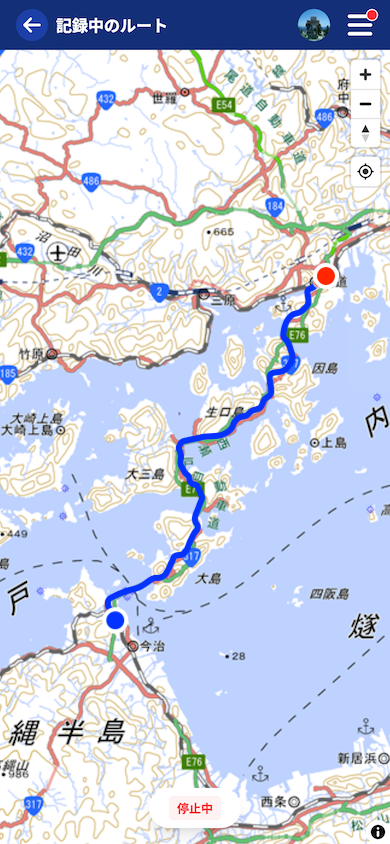
Tracking Is an App-Only Feature
Tracking is for the iOS / Android apps only. Since it needs to keep recording geographic information in the background, it is not available in the web browser version.


Content recorded in the app can also be edited and viewed when you log in to the web browser with the same account. The recording itself is done in the app, while editing can be done on either.
What You Can Do
Tracking is specialized for recording movement. You use the recorded trail later by importing it into a post’s map.
| Operation | Details |
|---|---|
| Record a trail | Keep recording your route with GPS even while the app is closed |
| Stop and resume anytime | Stop recording for a break, and resume later |
| Offline support | Saved on the device, so you can record even where there is no connection. Saving to the server happens after you’re back online |
Records Are Managed by Date and Imported into Posts
Recorded trails are saved by date. A single recording is not tied to a single touring post; you can choose a date and import any recording, current or past, into the map of a quick post or touring post. You can use the same recording in multiple posts.
How to Use Tracking
- Recording and managing — record a trail in the app and view past records
- Importing records — import a record into a post’s map, tidy up unwanted sections, and publish
Tutorials
- Quick Start
Getting started with RouteShare
- Explore
List, map, and article views
- Account
Sign up, login, profile, settings
- Create
Quick posts, touring posts, gadget articles
- Planning
Create, share, and copy touring plans
- Tracking
Recording and editing tracks
- Teams
Create and join teams, team posts and chat
- Actions
Likes, comments, follows
- Manage
Managing your posts